v2.0.1 - Specify new contacts
What's New in 2.1.1
We're excited to announce the release of version 2.1.1 of the UNOsync WhatsApp Integration for HubSpot. This update focuses on improving reliability and user experience, especially around contact management and the AutoSync feature.
🔄 More Robust AutoSync
The AutoSync feature has been significantly improved to ensure consistent syncing behavior and preserve your preferences:
Preserved AutoSync Settings: The AutoSync toggle state is now properly maintained during sync operations, preventing unexpected changes to your preferences
Enhanced Error Handling: Improved error management ensures the AutoSync feature works reliably even in edge cases
Better Debugging: Added comprehensive logging for easier troubleshooting and support
👤 Improved Contact Management
One of the most requested features has been better control over HubSpot contact creation. We've listened to your feedback and implemented significant improvements:
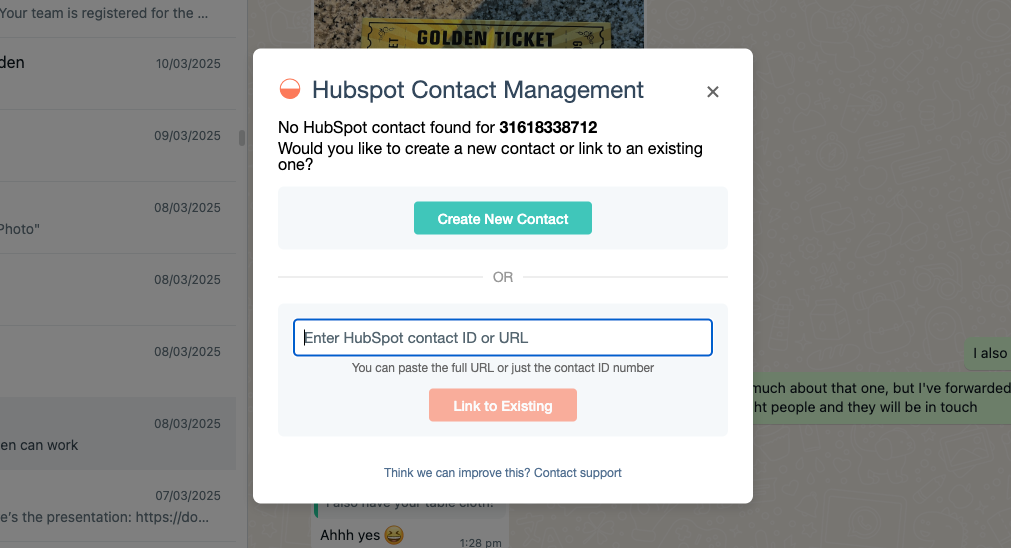
Link Existing Contacts: Added a new dialog that allows you to link WhatsApp conversations to existing HubSpot contacts instead of automatically creating new ones
Prevent Duplicate Contacts: This helps prevent duplicate contact creation in HubSpot, a common issue when phone numbers are stored in different formats
User-Friendly Messaging: Clear informational messages when a contact needs to be created or linked
🔧 Technical Improvements
Behind the scenes, we've made several technical improvements:
Better Error Handling: User cancellations are now handled gracefully with informative messages rather than error alerts
Server-Side Reliability: Enhanced contact synchronization between WhatsApp and HubSpot to ensure data consistency
Performance Optimizations: Streamlined code for faster synchronization operations
Why These Changes Matter
Many customers reported issues with duplicate contacts being created in HubSpot. This often happened because HubSpot typically uses email as the primary matching field, not phone numbers. Additionally, phone numbers can be stored in various formats (with or without country codes, spaces, etc.), making automatic matching difficult.
The new contact linking dialog gives you more control over this process, allowing you to:
Create a new contact when appropriate
Link to an existing contact by providing its HubSpot ID
Cancel the operation if needed, without triggering error messages
Coming Soon
In future updates, we plan to enhance the contact linking experience further by implementing:
HubSpot contact search directly from the linking dialog
Advanced contact matching options
More customization options for automatic syncing
Feedback
We value your feedback! If you encounter any issues or have suggestions for improving the UNOsync WhatsApp Integration, please contact our support team through the app or visit our support website.
This update is available now through the Chrome Web Store. If you have auto-updates enabled for Chrome extensions, you'll receive this update automatically. Otherwise, you can manually update from the Chrome Extensions page.